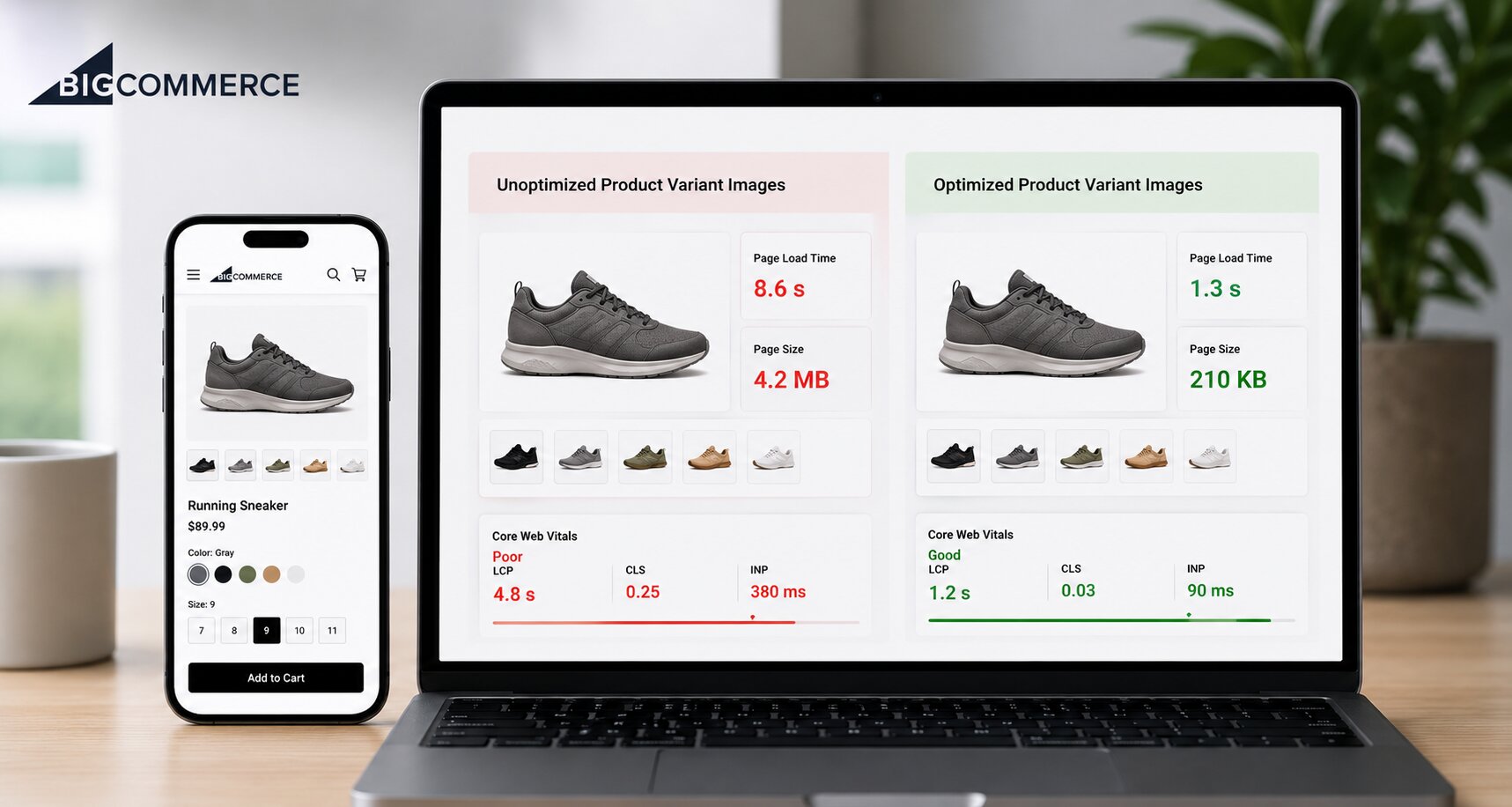
Product variant images are one of the biggest and most ignored performance problems in BigCommerce stores. Every color option, every size, every material variant carries its own image file. Multiply that across a catalog of hundreds of products, and the page weight becomes a real problem.
Uncompressed variant images slow down product pages, hurt Core Web Vitals scores, and cost conversions every single day. Using a reliable BigCommerce image optimizer app is one of the most impactful technical improvements a store can make, and this article breaks down exactly why and what good optimization actually looks like in practice.
What “Product Variant Images” Actually Means in BigCommerce
In BigCommerce’s V3 product catalog, a variant is a unique version of a product defined by a combination of options like color, size, or material. Each variant gets its own SKU, its own inventory tracking, and crucially, its own image. When a customer selects a specific color swatch, the storefront pulls that variant’s assigned image to update the product preview.
That image-per-variant model is powerful for user experience. It lets shoppers see exactly what they’re buying before they commit. But it also means a single product with 10 color options and 5 size options could generate up to 50 distinct variant images. Most merchants upload these straight from a camera roll or Photoshop export, often at 4MB to 8MB per file, well above what a browser actually needs to render a crisp product photo.
The platform accepts images up to 8MB per file. The practically optimized size for a 1280×1280 pixel product image, delivered in WebP format, is typically under 200KB, a 95%+ reduction with zero visible quality loss.
How Unoptimized Variant Images Hurt Store Performance
The damage shows up across multiple fronts, and none of them are easy to recover from once shoppers have already bounced.
Page Speed Takes the Biggest Hit
The connection between image bloat and slow load times is direct. An analysis of over 500 million site visits, reducing page load time by just one second, increases mobile conversions by 3%. Their data also shows that 63% of shoppers abandon pages that take longer than four seconds to load.
Variant images are a primary driver of load time on product pages. When a shopper switches between variants, the browser fetches a new image. If that image is a raw 5MB JPEG instead of a compressed 150KB WebP, the swap is sluggish.
Core Web Vitals Suffer Directly
Google’s Core Web Vitals are the technical SEO metrics that now directly influence search rankings. Two of them, Largest Contentful Paint (LCP) and Cumulative Layout Shift (CLS), are heavily tied to image performance. LCP measures how long it takes for the biggest visible element on a page to load; on most product pages, that’s the hero product image. CLS measures how much the layout jumps around while content loads, often caused by images that render without declared dimensions.
Unoptimized variant images consistently fail both metrics. Around 67% of websites have achieved a fast LCP score, which means stores still running raw imagery are increasingly behind the curve from an SEO standpoint.
Mobile Experience Gets Degraded
Mobile pages, on average, still take 8.6 seconds to fully load versus 2.5 seconds on desktop. A significant share of that time is image payload. A one-second delay in load time can reduce conversions by up to 20% and cut page views by 11%.
Why Variant Images Are Often Left Out of Optimization Workflows
Most merchants who optimize images focus on hero images, banners, and homepage carousels. Variant images get treated as a secondary upload and rarely pass through any compression or format conversion pipeline.
A few reasons this gap persists:
- Volume makes it feel overwhelming: A BigCommerce catalog with 500 products and 20 variants each means up to 10,000 variant images. Manually compressing each one isn’t realistic.
- The impact isn’t immediately obvious: Unlike a broken checkout, an oversized image doesn’t throw an error. The damage accumulates invisibly in load times, bounce rates, and rankings.
- Format confusion slows adoption: Many merchants aren’t sure whether to use JPEG, PNG, or WebP for variant images. The practical answer for most product photography is WebP, it delivers smaller file sizes than JPEG at equivalent visual quality, and it’s now natively supported by all major browsers.
A dedicated BigCommerce image optimizer app is built to close these gaps. Rather than requiring manual intervention on each upload, these tools automate compression, format conversion, and delivery across the entire catalog.
How Variant Image Optimization Supports SEO
Image optimization and SEO are not separate disciplines. They’re deeply connected, especially for e-commerce stores that depend on product page visibility.
Alt Text on Variant Images
Each variant image should have descriptive alt text that reflects what’s shown, not just “product-image-1.jpg.” Search engines use alt text to understand image content, and for BigCommerce stores selling visually differentiated products, properly tagged variant images can appear in Google Image Search and drive additional organic traffic.
Structured Data and Image Indexing
Google’s product-rich results can pull variant images into search snippets when structured data is implemented correctly. Properly optimized, correctly sized images are more likely to be crawled efficiently and indexed without timeout errors, something oversized images can cause when Googlebot’s crawler hits bandwidth limits.
Connecting image optimization to a broader technical SEO strategy, including internal linking, sitemap hygiene, and canonical tags, compounds the ranking benefit significantly.
What a Good Image Optimization Process Looks Like for BigCommerce Variants
Getting this right doesn’t require a developer or a complex infrastructure change. It requires a clear process applied consistently.
Step 1: Audit the current state. Use Google PageSpeed Insights or GTmetrix to run a product page with multiple variants. Check the “Opportunities” section for oversized images. Most unoptimized stores will surface this as a top issue.
Step 2: Choose the right format. For product photography (realistic images with color gradients), WebP is the best default. For graphics, icons, or images with transparency, PNG optimized through lossless compression works well.
Step 3: Compress before upload. Even if using an optimization app, starting with reasonably sized source files (1280×1280 pixels at 72–96 DPI) reduces the processing load and ensures the compressed output is clean.
Step 4: Automate at scale. Manual compression is not sustainable for a catalog with variant images. Using a reliable photo compressor automates the compression and WebP conversion process across all product and variant images, including newly uploaded ones.
Step 5: Use a CDN for delivery. BigCommerce’s native CDN helps, but some third-party tools layer additional CDN caching that serves images from edge nodes geographically closer to the shopper. This reduces latency, particularly for international customers.
Step 6: Measure performance improvements. After optimization, re-run PageSpeed Insights and check LCP scores. For BigCommerce merchants running Google Analytics 4, track bounce rate and session duration on product pages before and after as a conversion proxy.
Conclusion
Product variant images are one of the most overlooked performance levers in a BigCommerce store’s technical stack. They multiply quickly across a catalog, they load dynamically on user interaction, and they’re rarely optimized with the same care as homepage assets. The result is slower pages, lower Core Web Vitals scores, higher bounce rates, and conversion losses that compound over time. Treating image optimization, especially at the variant level, as a foundational part of store management, rather than an afterthought, is what separates high-performing BigCommerce stores from ones that leave revenue on the table.
Frequently Asked Questions
Q: How many images can be assigned to a BigCommerce product variant?
Only one image can be explicitly assigned to each variant in BigCommerce. That image displays on the storefront when the variant is selected, making its quality and optimization especially important.
Q: What is the recommended image size for BigCommerce product pages?
BigCommerce recommends 1280×1280 pixels in a square format for product images. Always check the specific theme guidelines, as requirements can vary.
Q: Does BigCommerce automatically compress uploaded images?
BigCommerce performs some native resizing but does not aggressively compress or convert images to modern formats like WebP. A dedicated BigCommerce image optimizer is needed for that.
Q: What file formats work best for BigCommerce variant images?
WebP is the recommended format for most product photography. BigCommerce supports GIF, JPEG, and PNG natively; WebP delivery is often handled through optimization apps or CDN layers.
Q: Can a photo compressor tool handle bulk variant images across a large catalog?
Yes. Modern photo compressor tools and optimization apps process entire catalogs in bulk, applying compression and format conversion automatically.