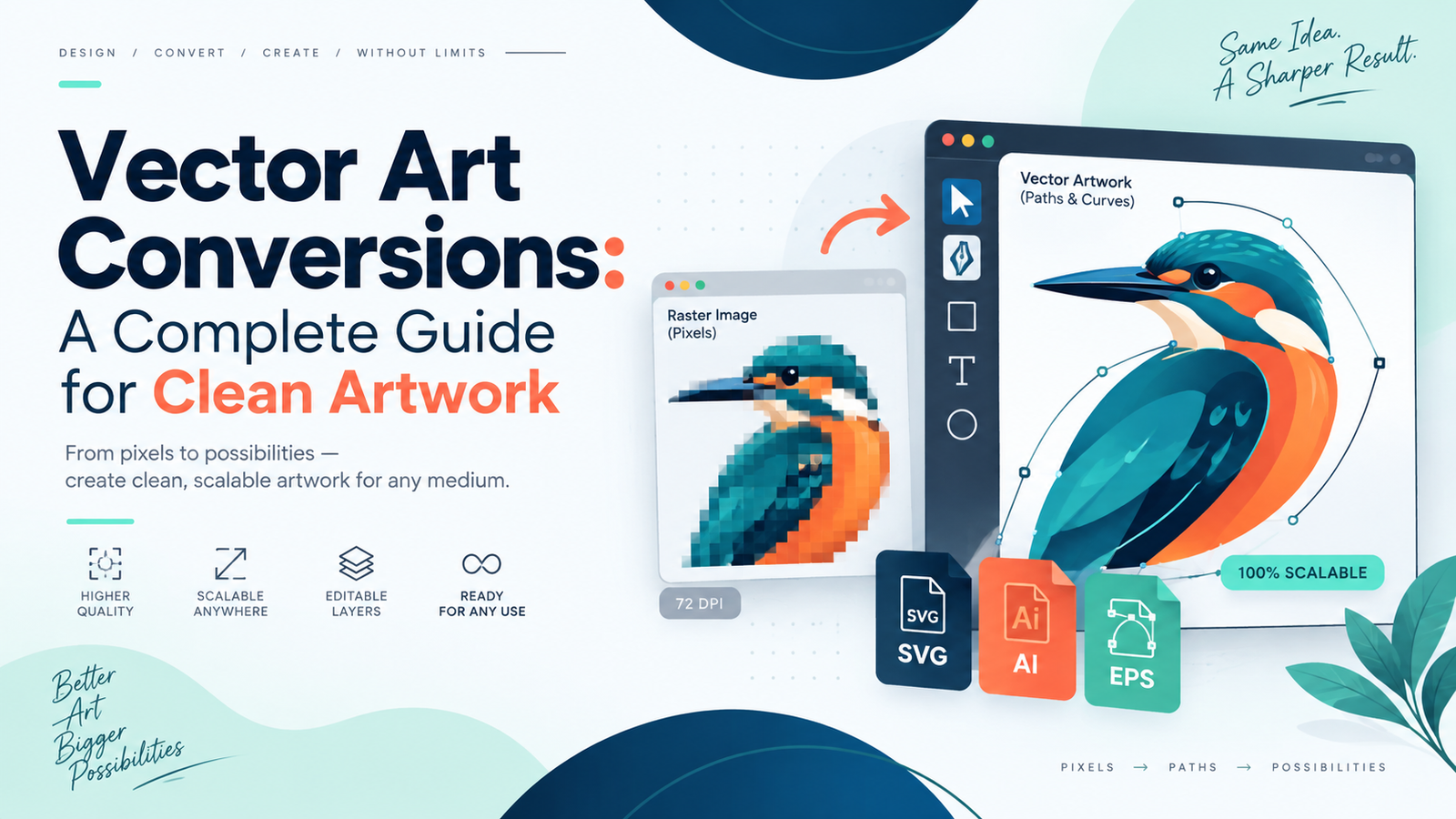
Low-resolution logos, JPGs, scanned artwork, and other pixel-based graphics can lose clarity when they are enlarged. Vector art conversions solve this problem by rebuilding artwork with scalable paths, curves, shapes, and lines instead of relying only on pixels. The result is clean, editable artwork that can be resized for different professional applications without the same pixelation problems associated with raster images.
At iDigitize, we help transform low-quality or raster artwork into professional vector files. If your existing design is blurry, pixelated, or unsuitable for production, our best vector art conversions services can provide a cleaner and more flexible version for uses such as logos, printing, signs, vinyl cutting, engraving, promotional products, and branding. Our vector service page confirms that we work with artwork for these types of professional applications.
What Are Vector Art Conversions?
Vector art conversions are the process of recreating raster or pixel-based artwork as vector graphics. Raster images such as JPG files are built from pixels. When a small raster image is enlarged significantly, those pixels can become visible, making edges appear blurry or jagged.
Vector graphics work differently. They use mathematical paths, shapes, curves, and points to define artwork. Because the artwork is not dependent on a fixed pixel grid, it can be resized much more effectively for different production requirements.
For example, a small company logo may look acceptable on a website but become blurry when enlarged for a banner. Converting that logo into a vector format creates a more suitable master artwork file that can be adapted to different sizes.
Why Are Vector Files Better for Professional Artwork?
The main advantage of vector artwork is flexibility. A properly prepared vector file gives designers, printers, sign makers, and businesses more control over how artwork is used.
Scalable Artwork
One of the biggest benefits of vector art conversions is scalability. A vector logo can be adapted for smaller applications or enlarged for signs and promotional graphics while maintaining clean paths and edges.
This is particularly useful when the same brand artwork must appear across multiple materials.
Easier Editing
Vector files can make individual design elements easier to edit. Depending on how the artwork is prepared, shapes, colors, lines, and other elements can be adjusted without recreating the entire design.
This is useful when a business needs different versions of a logo for different backgrounds, print methods, or brand materials.
Better Production Preparation
Professional printers and production companies often need artwork that is clean and easy to work with. Our website specifically identifies vector applications such as screen printing, vinyl cutting, laser cutting, signage, branding, merchandise, and promotional products.
Having appropriate vector artwork can reduce the need to repeatedly clean up a low-quality image before each new project.
When Do You Need Vector Art Conversions?
You may need vector conversion whenever your original artwork does not meet the requirements of your intended production method.
Common situations include:
- Your logo becomes blurry when enlarged.
- You only have an old JPG or PNG version of your logo.
- A printer asks you to provide vector artwork.
- You need artwork for screen printing.
- You want a file for vinyl cutting.
- You need artwork for signage or banners.
- You are preparing artwork for laser cutting or engraving.
- You need editable branding files.
- You have a sketch or signature that needs to become digital artwork.
- You need cleaner artwork for merchandise or promotional products.
A practical rule is simple: if the original image cannot be enlarged or edited cleanly enough for production, a vector version may be more suitable.
How Our Vector Conversion Process Works
Good vector art conversions require more than simply saving a JPG with a different file extension. The artwork itself must be recreated as vector paths and shapes.
Our vector conversion workflow centers on rebuilding the artwork so the finished file is cleaner and scalable.
1. Send Us Your Existing Artwork
You start with the best source image available. It might be:
- A JPG logo
- A PNG image
- A scanned drawing
- A sketch
- A signature
- Low-resolution artwork
- Existing brand artwork
A higher-quality reference usually makes it easier to identify small details, but our website also states that we accept low-quality JPG files for manual recreation.
2. We Review the Artwork
We look at the shapes, outlines, colors, text, and overall structure of the design.
This step matters because different artwork requires different treatment. A simple one-color logo is not the same as a detailed illustration containing multiple shapes, gradients, or fine lines.
3. We Recreate the Design as Vector Artwork
Instead of depending only on automatic conversion, the important visual elements are recreated using vector paths and shapes. This helps clean up rough edges, remove visible pixelation, and establish clear outlines.
This is where professional vector art conversions can be especially useful for old or low-resolution artwork.
4. The Artwork Is Checked
The finished design should be reviewed for details such as:
- Shape accuracy
- Clean curves
- Smooth outlines
- Correct proportions
- Color consistency
- Alignment
- Missing design elements
- Unwanted rough edges
The goal is not merely to produce a vector file extension. The goal is to create useful artwork that is suitable for its intended application.
5. You Receive the Required Files
Our current vector service lists formats including AI, EPS, SVG, PDF, DXF, CDR, PSD, and PNG, with the appropriate format depending on the project requirements.
For many professional workflows, AI, EPS, SVG, and PDF are commonly useful vector deliverables.
Where Can Vector Artwork Be Used?
Once vector art conversions are complete, the resulting artwork can support a wide variety of applications.
Logo and Brand Materials
A business logo may need to appear on business cards, websites, packaging, uniforms, vehicles, signs, and promotional products. Keeping a clean vector master gives the brand a more flexible source file for these different uses.
Screen Printing
Screen printers often need clean artwork with clearly defined shapes and colors. Vector artwork can make design preparation and separation more manageable.
Vinyl Cutting
Vinyl cutters work with paths and outlines, making clean vector shapes particularly valuable for decals, lettering, windows, signs, and vehicle graphics.
Signs and Banners
A small raster logo may not have enough resolution for large-format production. A vector file is a more practical option when artwork needs to be enlarged significantly.
Laser Cutting and Engraving
Some laser-based workflows require clearly defined paths. A properly prepared vector can provide the outlines required for suitable cutting or engraving projects.
What Makes a Good Vector Conversion?
Not every converted file is automatically good artwork. Quality vector art conversions should maintain the important characteristics of the original design while improving usability.
We recommend checking several things before approving your final file:
- Are the curves smooth?
- Are straight lines actually straight?
- Do letters and important details remain recognizable?
- Are the proportions accurate?
- Have unnecessary rough edges been removed?
- Are the colors appropriate?
- Does the artwork still look like the original?
- Can the file be resized cleanly?
- Is the file format appropriate for its intended production method?
For business logos, accuracy matters especially because the same artwork may be reused across many brand materials.
Manual Vector Conversion vs. Automatic Tracing
Automatic tracing software can sometimes produce a quick starting point, but complicated artwork may generate too many unnecessary anchor points, uneven curves, or inaccurate details.
Manual recreation gives greater control over important shapes and visual relationships.
At iDigitize, our vector service describes the process as manual tracing and states that our team recreates artwork line by line to remove pixelation and make designs scalable.
This is one reason businesses may choose best vector art conversions services instead of relying solely on an automated conversion tool when accuracy matters.
Common Vector Conversion Mistakes to Avoid
A few mistakes can reduce the usefulness of the final artwork.
Simply changing the extension: Renaming a JPG as an EPS or PDF does not automatically convert pixel artwork into true vector paths.
Using a poor automatic trace: Automatic tracing may introduce irregular shapes or excessive nodes.
Ignoring small details: Tiny gaps, uneven lines, and distorted text can become more noticeable when artwork is enlarged.
Choosing the wrong format: The correct format depends on where the artwork will be used.
Not checking the production purpose: Artwork for screen printing may have different preparation needs than a logo being prepared for vinyl cutting or signage.
The best conversion process begins by understanding how the finished artwork will actually be used.
Conclusion
Clean artwork gives you more options for printing, branding, signage, merchandise, and other professional applications. If your existing design is pixelated, blurry, or difficult to resize, IDigitize can help recreate it as scalable artwork. Professional vector art conversions give you a stronger master file that is easier to reuse across different projects.
Instead of repeatedly working from an unsuitable low-resolution image, keep a clean vector version of your important artwork. If you need a logo, image, sketch, or other design recreated, our best vector art conversions services can help you prepare clean files for your next project.
Frequently Asked Questions
What is vector art conversion?
Vector art conversion is the process of recreating pixel-based artwork as scalable vector graphics made from paths, shapes, and curves. It is commonly used when existing JPG, PNG, scanned, or low-resolution artwork needs to become cleaner, editable, or more suitable for professional production.
Why do I need vector art conversions for my logo?
You may need vector conversion if your logo becomes blurry when enlarged or if a printer, sign maker, or production company requires scalable artwork. A vector version provides a more flexible master file that can be adapted for different sizes and applications.
Can a low-quality JPG be converted to vector artwork?
Yes. Low-quality JPG artwork can be manually recreated as vector artwork, although the quality and clarity of the reference image affect how easily small details can be interpreted. Providing the clearest available version helps us reproduce the original design more accurately.
Which vector file format should I choose?
The right format depends on how you plan to use the artwork. Our service currently supports formats including AI, EPS, SVG, PDF, DXF, and CDR, among others. For example, different printers, designers, cutting systems, or production companies may request different formats.
Can vector artwork be used for printing and vinyl cutting?
Yes. Properly prepared vector artwork is widely useful for professional printing and vinyl-cutting workflows. Our vector service also supports uses such as screen printing, signage, laser applications, branding, packaging, promotional products, and similar production work.