
Introduction
Almost no company runs on a single application. Learners who join Oracle Fusion Technical Training in Chennai at Soft Online Training often ask how Oracle Fusion shares data with banks, payroll vendors, CRMs, and custom apps without anyone re-keying it by hand. The answer is Oracle Integration Cloud, or OIC. It sits between Oracle Fusion and the rest of the business, moving data, translating formats, and kicking off the next step automatically. Here is how it works, in plain terms.
What Oracle Integration Cloud Actually Does
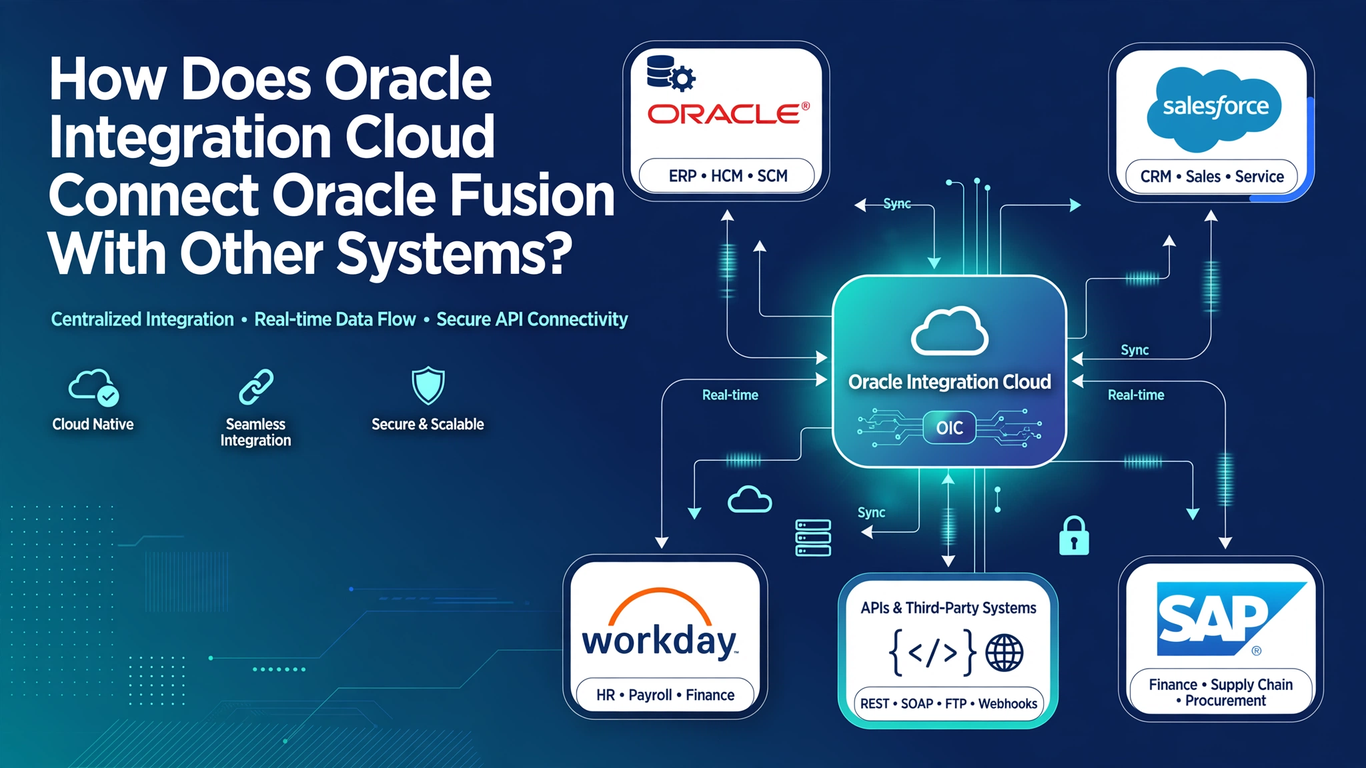
Think of OIC as a translator and traffic controller. Oracle Fusion speaks in its own business objects: invoices, journals, workers, purchase orders. A bank might expect a flat file. A web store might send JSON. A legacy system might only understand SOAP. OIC receives a message from one side, reshapes it so the other side understands, and delivers it, all inside a flow you design visually.
Each flow is called an integration. You pick a trigger (an event, a schedule, or an incoming call), then add actions such as mapping fields, calling another system, looping through records, or sending a notification. Because the design happens in a browser canvas, a good part of the work is configuration rather than heavy coding. That is a big reason OIC became the standard integration layer for Fusion projects.
Adapters: The Connectors Behind Every Integration
The pieces that do the actual connecting are adapters. An adapter knows how to talk to one kind of system, so you do not have to hand-write every technical detail.
The Oracle ERP Cloud adapter and the Oracle HCM Cloud adapter understand Fusion’s own services, business events, and file-based import methods. Beyond those, OIC ships with adapters for REST, SOAP, FTP and SFTP, databases, email, and many third-party apps like Salesforce, ServiceNow, and Workday. When no prebuilt adapter fits, the generic REST adapter covers most modern systems, since nearly everything today exposes some kind of API.
Each adapter is configured once as a connection, holding the URL, security details, and credentials. Then you reuse it across many integrations. When a password changes, you update one connection instead of fifty flows.
Integration Styles You Will Meet in Oracle Fusion Technical Training in Chennai
OIC does not force one pattern on every problem. Anyone going through Oracle Fusion Technical Training in Chennai will see a handful of styles again and again.
App-driven orchestration reacts in real time. A request comes in, OIC calls two or three systems in order, applies logic in between, and returns a result. This suits things like validating a customer in one system before creating an order in another.
Scheduled integrations run at set times. A nightly job might pick up a file from an SFTP folder, read each row, and push the data into Fusion. Many bank statements and payroll loads work this way.
Event-based integrations start when something happens inside Fusion, such as a supplier being approved or an employee being hired. OIC listens for the business event and passes the details to whichever system needs them.
Prebuilt integrations and recipes are ready-made templates for common pairings. They give you a working starting point you can adjust instead of building from nothing.
Knowing which style fits a requirement is often more valuable than knowing every feature, because a wrong choice usually shows up later as slow, fragile processing.
How Oracle Fusion Sends and Receives Data Through OIC
Data moves in two directions, and the method depends on volume.
For small, real-time exchanges, OIC calls Fusion’s REST or SOAP web services. Creating a single invoice, reading a worker record, or updating a purchase order status are good examples. The calls are quick, and the response tells you immediately whether it worked.
For bulk work, files are the better route. OIC can build a file in the format Fusion expects, upload it to the right location, and then submit the import process through the ERP integration service. This is how large volumes of journals, invoices, or master data usually get in. Going the other way, OIC can pick up, extract or report output from Fusion and deliver it to a warehouse, a bank, or a partner.
Inside each integration, the mapper is where much of the real thinking happens. You connect source fields to target fields, apply conversions, handle dates and currencies, and set defaults. A surprising share of integration bugs trace back to mapping, so careful testing here saves a lot of pain.
Monitoring, Error Handling, and Real Project Habits
An integration that works once is not finished. It has to keep working on a Tuesday night when a file arrives half empty or a target system is down.
OIC has a monitoring dashboard showing every run, whether it succeeded or failed, and the payload at each step. When something breaks, you can open the failed instance, see exactly where it stopped, fix the cause, and resubmit it. You can also add fault handling inside the flow itself, for example catching an error, sending an email to the support team, and logging the failed record so nothing silently disappears.
Good teams build a few habits early: name integrations clearly, keep connections tidy, log meaningful identifiers like invoice numbers, and document what each flow expects. These sound small, but they decide whether support is calm or chaotic six months after go-live.
Why Oracle Fusion Technical Training in Chennai Should Include OIC Practice
Reading about integration only goes so far. The real understanding comes from building a flow, watching it fail, and tracing why. A solid Oracle Fusion Technical Training in Chennai program should therefore pair theory with hands-on labs: creating connections, building a scheduled file load, calling a Fusion REST service, mapping fields, and troubleshooting a failed run.
It also helps to understand how OIC fits with the rest of the technical toolkit. FBDI and HCM Data Loader handle bulk loading, REST and SOAP handle service calls, and OTBI and BI Publisher handle reporting. OIC is the layer that ties those together into complete business processes. Someone who can explain that bigger picture in an interview stands out quickly from someone who only knows one tool.
Conclusion
Oracle Integration Cloud connects Oracle Fusion to other systems through adapters, reusable connections, flexible integration styles, and a visual design canvas, with monitoring to keep everything running. It turns a collection of separate applications into one joined-up business process. If you want to build this skill with guided labs and real scenarios, Soft Online Training offers a practical path, and pairing it with focused Oracle Fusion Technical Training in Chennai gives you the hands-on confidence employers look for in integration roles.