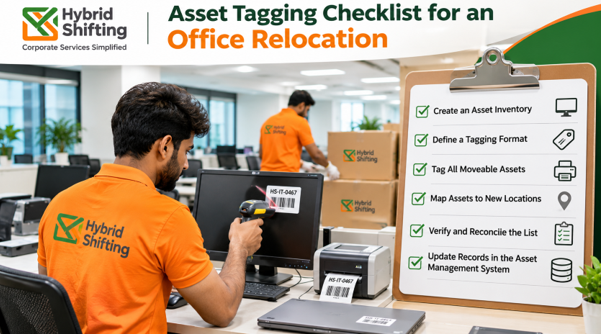
For an office relocation, tag every asset before it is packed. Clean your asset register, assign each item a unique ID, attach the tag, photograph and record its condition, scan it at packing, loading and arrival, and reconcile everything against the register at handover. Finish with an exceptions report that lists anything missing, damaged or in the wrong place.
An office move is where untagged assets go missing. The moment equipment is packed, it disappears from view, and losses are often discovered weeks later, at the next audit. Tagging turns the move into a controlled chain of custody, so you know what left, what arrived and what did not.
This checklist walks you through every stage, from planning to post-move clean-up. It sits alongside our full guide on how to shift an office in India.
Why Should You Tag Assets Before an Office Move?
Tagging gives each asset a permanent, machine-readable identity. That lets you:
- Prove what left the old office and what arrived at the new one
- Find missing items quickly, with evidence
- Unpack and place equipment faster, since each label shows owner and destination
- Update your fixed asset register with verified locations
- Produce records your finance and audit teams can use
If your move also feeds an audit cycle, see our guide to fixed asset physical verification under CARO 2020.
What Are the Stages of the Checklist?
The checklist runs in seven stages:
- Plan and clean the register
- Tag on the floor
- Pack and label cartons
- Dispatch and transit
- Arrival and unpacking
- Reconcile and hand over
- Update records after the move
Stage 1: Plan and Clean the Register
Start 60 to 90 days before the move for most offices. This is the stage that decides how smooth the rest will be.
- Export the current fixed asset register and IT asset list
- Remove disposed, sold or written-off items
- Fix duplicates and inconsistent names or categories
- Decide which assets are moving, which are being sold or recycled and which are being left behind
- Appoint one owner each from finance, IT and facilities
- Agree who will tag, who will verify and who signs off
- Choose the tag type for each asset class
- Agree one ID scheme: a permanent, unique ID per asset
Do not encode location or department in the ID. Both change in a move, and you would have to re-label everything. For choosing between barcode, QR and RFID, read our asset tagging guide to QR code, barcode and RFID.
Stage 2: Tag on the Floor
This is the survey and tagging walk-through.
- Walk every floor and room, and tag assets in a consistent position
- Use one label per asset, with the unique ID
- Choose label material for the surface and environment, whether metal, plastic, wood or glass
- Use on-metal RFID tags on servers, racks and metal equipment, if you use RFID
- Photograph each asset with its tag visible
- Record condition, including existing damage, scratches and missing parts
- Link each tag ID to its record in the register
- Flag any asset found but not in the register, and any recorded asset that cannot be found
- Capture the current location, floor and custodian
The condition record is your reference point. If something arrives damaged, you can show what it looked like before.
Stage 3: Pack and Label Cartons
Cartons need an identity too, not just the items inside.
- Give every carton, crate or trolley its own ID
- Link each carton ID to the asset IDs inside it
- Label with owner, destination floor and desk or room
- Pack IT equipment with anti-static protection, and keep accessories with their device
- Remove or back up data according to your IT and data policy
- Seal cartons and record the seal number for high-value items
- Keep fragile and sensitive equipment separate
- Hold back assets that must not move, such as items being sold or recycled
For servers and data tapes, make sure packing and chain-of-custody documentation are in place. Hybrid Shifting applies a Zero Data Risk Protocol to IT assets, data tapes and servers.
Stage 4: Dispatch and Transit
- Scan tags as items and cartons are loaded onto the vehicle
- Generate a manifest of exactly what left, by asset and carton ID
- Have both the sender and the transport lead confirm the manifest
- Record vehicle, time and route
- Use tracked, insured transport, and share tracking updates with your project lead
- Keep a supervisor at origin until the last item is out and counted
Hybrid Shifting uses GPS-tracked, insured transport with real-time client visibility updates.
Stage 5: Arrival and Unpacking
- Check seals and cartons on arrival before opening
- Scan tags on arrival, to confirm everything on the manifest has arrived
- Note any damage or missing items immediately, with photos
- Unpack by floor and team, using the destination labels
- Scan each asset again as it is placed at its desk or room
- Reinstall and test IT equipment before staff return
- Keep the new office’s location structure ready, with floors, rooms and desks, so scans record the right place
Stage 6: Reconcile and Hand Over
This is where the tagging pays off.
- Compare the origin manifest, the arrival scans and the register
- Sort differences into matched, missing, extra, wrong location and damaged
- Assign each exception an owner and a deadline
- Prepare an exceptions report with evidence
- Resolve open items before final acceptance
- Obtain signed handover from the project lead and department owners
Hybrid Shifting scans tags at packing, loading, delivery and unpacking, then reconciles at destination to produce an audit-ready MIS report.
Stage 7: Update Records After the Move
- Update the fixed asset register with verified locations and custodians
- Sync the data with your ERP. See how ERP integration works with physical asset data
- Tag any new assets bought for the new office at receipt
- Close out records for assets sold, recycled or scrapped
- Hand back the old premises. See asset buyback and office reinstatement
- Schedule your next verification cycle
- Store the manifest, scan logs, photos and reports
Which Tag Should You Use for Each Asset?
Match the tag to the asset, not the other way around.
- Laptops, monitors and peripherals: barcode or QR is usually enough. RFID helps with large fleets.
- Servers, network gear and racks: on-metal RFID with a printed ID, so a full rack can be counted without opening it.
- Office furniture and fixtures: a durable barcode or QR label, since value per item is low and tag cost matters.
- High-value or art pieces: discreet tagging with a non-damaging attachment. See high-value asset logistics.
- Cartons and crates: RFID or dual labels, so bulk scanning is possible without opening anything.
A dual label carries an RFID chip plus a printed code with the same ID, giving fast bulk scans and a manual fallback.
What About Special Cases?
Laptops held by remote or work-from-home employees. Tag and record them, and decide whether they stay with employees or return to the new office.
Assets going into storage. Tag them, scan them into storage and record the storage location, so they can be found later.
Assets being sold or recycled. Tag them, then exclude them from the move manifest and track them through IT asset buyback or recycling. See asset buyback vs resale vs e-waste recycling.
Phased moves. Reconcile after each phase, not only at the end, so errors do not pile up.
Multi-city moves. Use one ID scheme across all sites and one master register.
Who Does What?
- Project lead: owns the plan, timeline and sign-off
- Finance: owns the register and approves corrections
- IT: owns data, backups, network cutover and IT asset records
- Facilities and admin: own floors, furniture, access and building permissions
- Moving partner: tags or verifies assets, packs, tracks, delivers and reconciles
- Department heads: confirm their team’s assets on both sides
Agree these in writing before tagging begins.
What Mistakes Should You Avoid?
- Tagging without cleaning the register first
- Encoding location in the ID, then re-labelling after the move
- Tagging only IT equipment and ignoring furniture and fixtures
- Not tagging cartons, only the items inside
- Skipping the arrival scan
- Leaving scan data in a standalone file that never updates the register
- Using paper labels on metal, hot or damp surfaces
- Starting the week before the move
- Reconciling only at the very end
When Should You Start?
For most offices, start planning 60 to 90 days ahead. Tag and photograph assets in the weeks before packing, so every item is recorded before it moves. Hybrid Shifting states that small to mid-size offices of up to 100 seats can typically be completed over a weekend, while larger multi-floor or multi-building moves are phased.
How Does Hybrid Shifting Handle Asset Tagging in a Move?
Hybrid Shifting is India’s Corporate Services Solutions company. Its commercial moving solutions and asset management solutions work together:
- Every item is assigned a unique barcode or RFID tag before packing begins
- Tags are scanned at packing, loading, delivery and unpacking
- Assets are reconciled at destination, with an audit-ready MIS report
- A dedicated move manager acts as your single point of contact
- A five-stage process runs from discovery and assessment to setup and handover
- Insured, GPS-tracked transport gives real-time visibility
- Asset buyback and reinstatement can close out the old site under the same partner. See asset buyback and reinstatement
Hybrid Shifting has tagged 1M+ assets, completed 10M+ sq. ft. of office relocation and serves 100+ clients. See our infrastructure and clients. For help choosing a partner, read our guide to corporate relocation services and complete office moves and our commercial moving solutions overview.
Planning an office move? Talk to Hybrid Shifting for a site survey and tagging plan. Request a quote
FAQs
When should assets be tagged during an office relocation?
Before anything is packed. Tag and photograph each asset at origin, scan at dispatch and scan again on arrival, so every item can be reconciled against the register.
What should an asset tag contain?
A unique asset ID that never changes, and optionally the company name and a contact line. Details such as cost, owner, location and maintenance history belong in the register, linked to that ID.
Should I tag cartons as well as assets?
Yes. Give each carton its own ID and link it to the assets inside, so you can track and scan cartons in bulk and still know what each contains.
Is RFID, QR or barcode best for an office move?
There is no single best option. Barcodes or QR suit laptops and furniture, on-metal RFID suits servers and racks, and RFID or dual labels suit bulk scanning of cartons. Most moves use a mix.
What is an exceptions report?
A report listing anything missing, damaged, extra or in a different location after the move, with evidence and an owner for each item, so issues can be resolved at handover.
How do I handle assets I am not moving?
Tag them, exclude them from the move manifest and track them through sale, buyback, recycling or disposal, so the register is updated.
How early should I start tagging?
Plan 60 to 90 days ahead for most offices, and tag in the weeks before packing. Larger or multi-site moves need more time.
Can the moving company handle tagging and reconciliation?
Yes, if it offers asset management alongside moving. Ask whether every asset is tagged before packing, scanned at each stage and reconciled in a handover report.