
Introduction
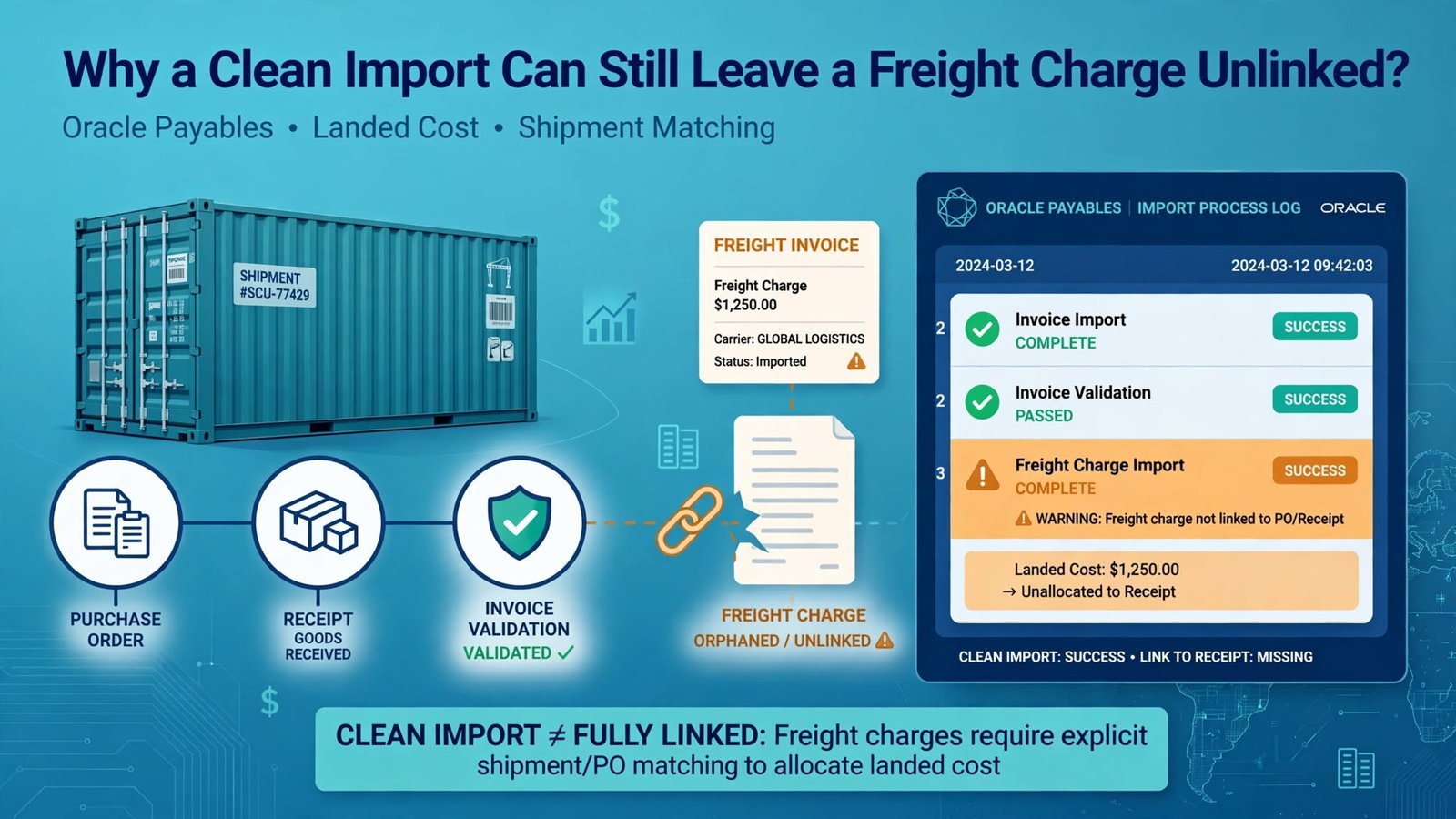
Here’s a situation that catches people out. At Soft Online Training, we often see learners load a batch of freight invoices, including ocean freight for forty containers, and watch the import finish with no rejections. Accounting moves on and everyone relaxes. Nothing looks wrong on screen. A few days later, the cost asks why one charge isn’t showing against the shipment.
The reason is tiny: one line carries a charge name that doesn’t exist. If you’re doing Oracle Fusion Financials Training in Bangalore, this is a good case to understand early, because “imported fine” and “fully linked” are not the same thing.
Two Outcomes in One Import: Where Oracle Fusion Financials Training in Bangalore Should Start
Creating the invoice and linking the charge are two separate jobs, each with its own checks. The invoice line creates the payable. The association then connects that line to a landed cost charge. So a good invoice can sit beside a failed link.
That’s deliberate, because one bad reference shouldn’t stall a hundred good invoices. But someone still has to check. If your team only watches rejected invoices, the ones with a missing costing link will never come up.
Before loading, decide what each freight line should look like: charge name, reference details, target line. Then ask two questions per line: did the invoice import, and did the charge attach? Until both are answered, or someone owns the exception, the batch isn’t done.
Build the Invoice Line and Its Charge Row From the Same Source
The 26D release adds a charge-reference sheet to the usual Payables invoice import workbook. On a line marked as landed-cost enabled, the extra row can hold the charge name, reference type name, reference value, comments, and a landed cost line number if you need one. Invoice identifier, invoice line number and charge name are required, and those three are what tie the row to its parent.
I’d build both sets of rows from a single source. Pull them from separate extracts and join them later, and sooner or later a line number slips by one. You get a nicely filled row pointing at the wrong invoice line, and nobody spots it until reconciliation. Check charge names against approved master data before you create the file. Keep leading zeros on identifiers. Validate reference values by type, and remember that dates need year-month-day. And don’t trust what Excel displays; check the value that actually got exported.
What the Import Actually Starts
When the invoice import runs, it picks up any populated charge-reference records, and a background job tries to link them to the invoice lines. The first process finishing says nothing about the second, so keep the process IDs and output for both.
If something looks off, work in order: confirm the invoice and line exist under the expected identifiers, then check whether the association job linked the child row or logged an error.
The landed-cost-enabled flag works like a gate. Leave it off and the charge row is ignored, however well it’s filled in. An enabled line with no charge record imports and can be linked later. Different problems, so don’t label both “link missing,” or people will check the wrong thing.
Fixing the Bad Charge Name Without Touching the Invoice
For the failed ocean freight line, compare the submitted charge name with the configured one, exactly as your setup defines it. Then check the required keys, whether the parent line is enabled, the reference type, the reference value and the target line. Validation errors land in the landed cost interface while the rest of the batch imports as normal, so start there and in the process output. Please don’t delete a legitimate payable just because its costing link is incomplete.
Then decide what kind of defect you’re looking at. A typo in the charge name is a source-data problem. A valid new charge that isn’t in the target environment is a setup or migration problem. A bad date is a transformation problem. A wrong line number is a relationship problem. That tells you who owns the fix, and it stops the team reloading the same bad file three times.
Reconcile by Line, Not by Total
Batch totals can match to the cent while associations quietly fail. Reconcile on invoice identifier, line number and charge name instead, adding reference details when they separate several targets. Count what you expected, what linked, what failed and what you left out on purpose, and put a reason against every gap. In the forty-container batch, that one failed line should stay visible even though the invoice count and value match the source.
Watch for duplicates too. If the source sends the same charge reference twice, catch it before import or find out how the system reacts. If an invoice line truly needs several landed cost charges, each child row needs a clear business reason. And don’t depend on the amount alone, since freight and insurance can easily share a value while being different costs.
A Test Pack for Anyone Doing Oracle Fusion Financials Training in Bangalore
Start with one valid enabled line and a valid charge, then break one thing at a time. Try a missing invoice identifier, a missing line number, a bad charge name, a disabled parent line, a malformed date, no optional fields, the wrong target line, a duplicate child row, and an enabled line with no association row. Put two invoices in the same batch so you can watch one association fail while the other succeeds.
For every case, write down what should happen at both layers. Does the invoice import? Does the job pick up the child row? Is a link created, where does the error go, and do the other invoices carry on? Test access as well. The association job runs under the existing invoice-import privilege, not a separate one, so use that security context. Last, rerun the corrected cases and confirm the fix didn’t create duplicate invoices or links. A clean retest closes the exception. A “completed” status doesn’t.
Conclusion
An imported freight invoice and a linked landed cost charge are two separate facts, and each needs its own proof. Build the invoice line and charge row together, switch landed cost on, check the charge and reference data, keep both process outputs, and reconcile line by line. When one link fails, read the interface error, leave the valid payable alone, and retest until the link is complete and not doubled up. Good Oracle Fusion Financials Training in Bangalore makes this feel routine, so nobody treats invoice success as the finish line.