
Introduction
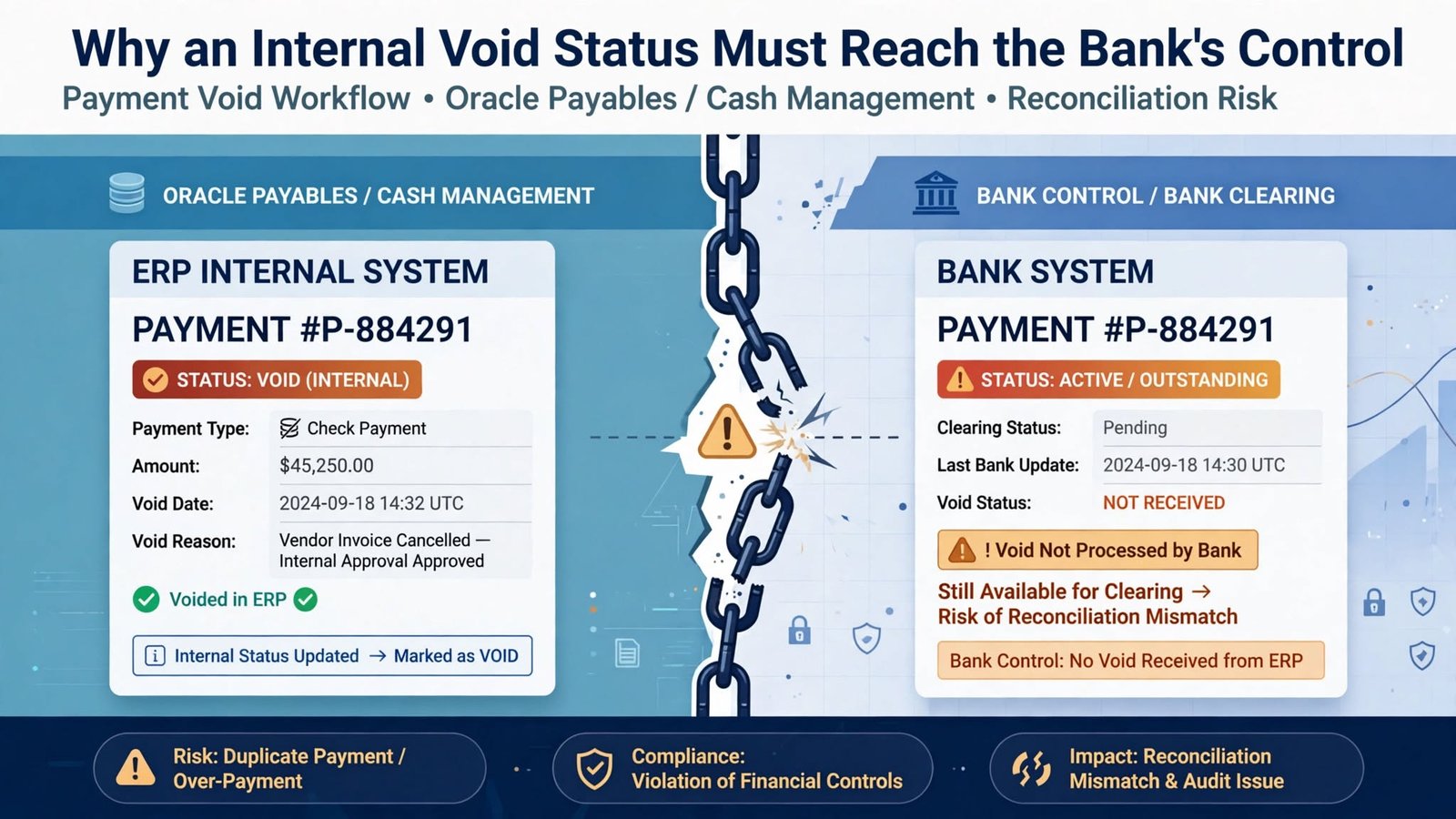
Say a check goes out on Monday and sits in the positive pay issue file. At Tech Leads IT, we use this scenario in Oracle Cloud Financials Online Training because it shows how easily two systems drift apart. On Tuesday, someone learns the envelope never arrived, so the payment is voided.
The bank hasn’t moved on, though. Unless it receives the void through the agreed channel, its records still treat that check number, amount, and payee as good to pay. That’s why we walk through it in Oracle Cloud Financials Training Online: the same check is dead on your side and alive on theirs.
Two Records, One Check
Your system tracks the payment for accounting and status. The bank keeps its own list to screen checks when they’re presented. When a check is issued, both lists should say it’s good. When it’s voided, both should say it isn’t.
The risk is the gap between those two moments. If someone finds the lost envelope, or copies the check, and presents it while the bank still has the original issue on file, the bank has every reason to honor it. You’d catch it in reconciliation eventually, but by then the money’s gone. Positive pay is meant to stop that, not help you explain it afterward.
I find it easiest to picture the check’s life as pairs of steps. It’s created, issued, sent, and acknowledged. Then it’s voided internally, the void is sent, and the void is acknowledged. Banks don’t all send back the same amount of detail, so you have to decide with yours what counts as proof that the message arrived.
A generated file alone doesn’t prove much. You want the process output, a record of who handed it off, the bank’s receipt or portal status if there is one, and a reconciliation showing no voids were left out or sent twice.
Choosing a Void-Only Population in Oracle Cloud Financials Online Training
Oracle added 26D support for ISO 20022 positive pay files carrying voided-check details, described in Oracle Financials 26D: ISO Positive Pay File for Voided Checks. It covers JPMorgan Chase and PNC, not Bank of America, so if your checks go through them, this won’t help yet.
Someone runs it by hand. They start Create Positive Pay File, choose the predefined positive pay payment process profile, enter the payment file number, and set Select Status to Voided Payments Only. That keeps cancellations apart from normal issue reporting, and the payment file number ties the message to the original file and builds the message ID.
For the lost envelope, confirm the JPMorgan Chase or PNC profile has its ISO format assigned, pick the payment file number tied to the voided payment, submit, and read the output before it leaves.
Don’t treat these choices as routine. A wrong payment file number points the void at the wrong checks and changes the message ID. Next month’s operator should get the same result, and a reviewer should agree.
Reconciling the File Back to the Source Checks
You want to count at three points. Start with the list of voided checks that belong in this run. Next, compare their count and total to the file or process report. Then compare what you actually sent to what the bank says it received.
Don’t lean on the total alone. A missing record and a duplicate can cancel each other out and leave the amount looking perfect. So check the details too: the check number, account, amount, currency if it matters, issue date, and void status, following whatever rules your bank’s setup uses.
Keep the void tied to the original issue. Voiding doesn’t erase the fact that the check was issued. Someone reviewing this later should be able to see when it went out, when it showed up in positive pay, why it was voided and when, which run carried the cancellation, and what showed it was delivered.
That trail also helps when a replacement check comes into the picture. A replacement is a new check with its own life, so it doesn’t borrow anything from the old one. If you can’t tell a proper replacement from an accidental second payment, you’ll have a problem sooner or later.
Cutoff Timing Is Where the Risk Hides
Your exposure comes down to timing. Void a check before the bank’s daily cutoff and the update will likely take effect that day; void it after, and the gap may stay open longer. Base that expectation on your bank agreement and your own procedure, not a hunch.
Record when the void happened, when the file was generated and sent, which cutoff applied, and when you expect it to take effect. If it can’t take effect quickly enough, follow your escalation or stop-payment process. A generated file doesn’t mean you’re covered.
Test weekends and holidays, since your business day isn’t always the bank’s processing day. Do the same for checks voided after the file was built but before it went out: decide whether to regenerate, send an extra void-only run, and what happens to the older version.
Never let anyone pick between similar-looking files to save time. Use unique run identifiers, restricted storage, and a clear release checkpoint.
When a Transmission Fails: Retries and Duplicates
Say the connection times out halfway through. Did the bank get the file and just fail to confirm, or did it never arrive? Resend blindly and you might create a duplicate. Sit and wait and a void might never get reported.
Start by looking for whatever evidence of transmission you have. If that doesn’t settle it, call the bank through the approved channel. If a resend is approved, keep a record of how the attempts relate, and ask how the bank handles a duplicate cancellation.
What you shouldn’t do is open the generated file and patch it by hand. Manual edits make the trail harder to follow and can break the message structure you agreed on. If the population or setup is wrong, fix it where the problem started, regenerate under control, and keep the rejected version separate from the approved one.
It also helps to split the work between people. The one who voids a payment shouldn’t be the only one who releases the cancellation file and signs off on the reconciliation. That isn’t red tape. When fraud is the worry, you want a second person confirming the work.
Test Cases Worth Building in Oracle Cloud Financials Training Online
If you’re putting together a test pack, go for the awkward situations. Void a check before any issue file exists. Void another after the issue file was sent. Try valid voids tied to different payment file numbers. Add a replacement check, a void after cutoff, and a simulated timeout during transmission.
Then add the ones that should fail. That means a payment canceled before the check was ever created, a stopped payment, a bank profile that isn’t supported, and a payment file number that doesn’t belong to the void you meant. For each case, write down whether a void message should be generated, which checks belong in it, and what proof you need before releasing it.
A “completed” status doesn’t tell you much by itself. Look at what actually happened. Do the eligible voids appear exactly once? Are ineligible payments missing, as they should be? Do the identifiers trace back to the original issues? Do you have evidence of the outcome on the bank’s side? Are replacements still separate?
After go-live, reconcile the full chain and spot-check it now and then. A small exception log goes a long way. Keep generation failures, transmission failures, bank rejections, cutoff escalations, and unconfirmed acknowledgments apart, since each one needs a different owner and a different fix.
Conclusion
A void only works as a control once your system and the bank agree again. Pick the right void-only population, trace it from source to proof of transmission, and respect the cutoffs. If you can’t tell whether the bank got the file, find out before you resend.
Keep replacement checks on their own track, and hold on to the trail from the original issue to the void. It makes a hands-on exercise in Oracle Cloud Financials Online Training and Oracle Cloud Financials Training Online, and it keeps a lost piece of paper from staying valid just because the accounting system says it’s gone.