Introduction
A few years ago, a colleague spent half a day chasing a tax difference on a supplier invoice. At Tech Leads IT, we share her story in every Oracle Fusion Financials Training session. The total looked ordinary and the rate looked right, yet the tax line was off. She began with the journal, found nothing useful, and discovered the answer upstream, in how the invoice was entered.
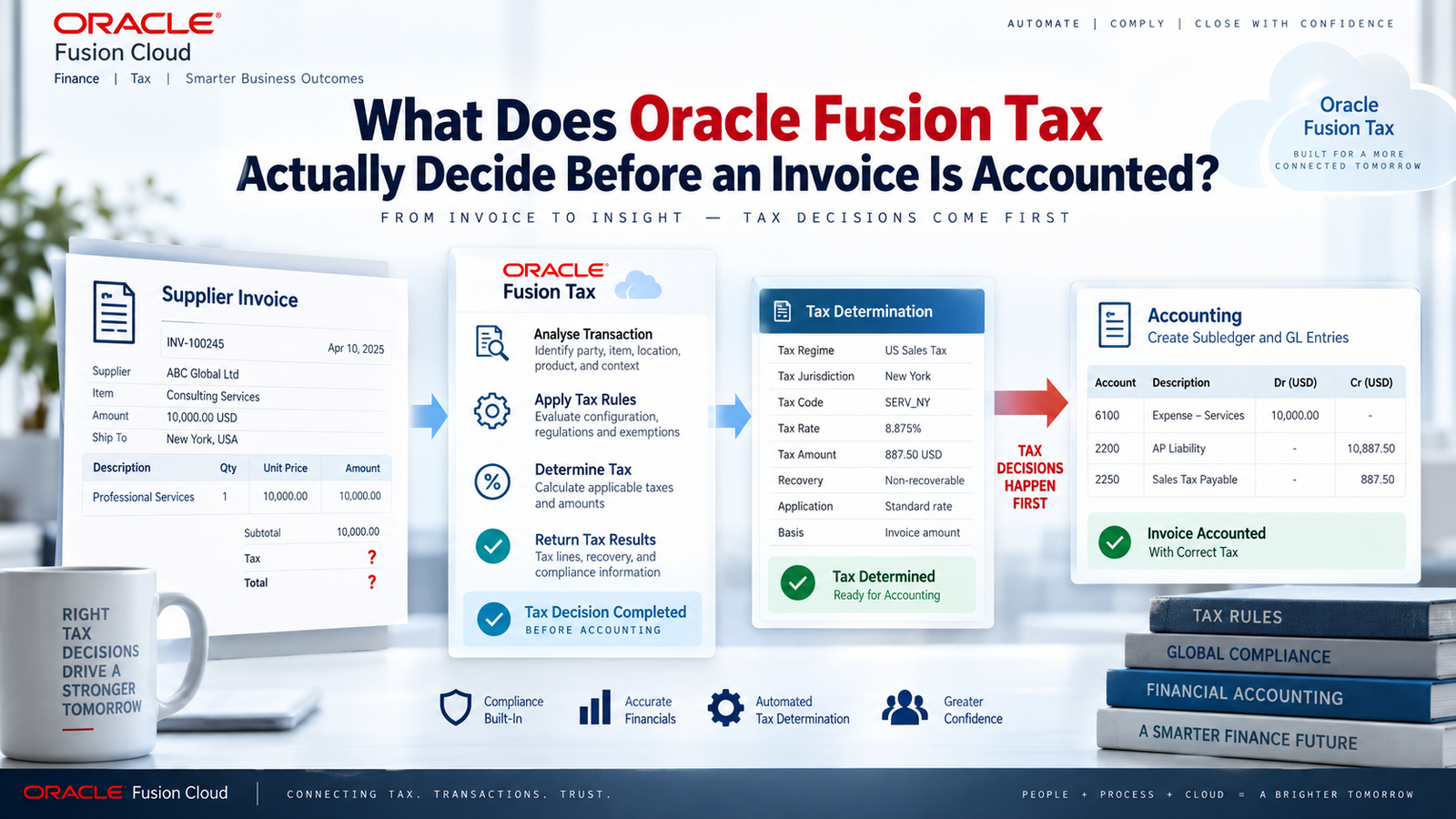
That is why our Oracle Fusion Financials Online Training explains Fusion Tax by following the order of decisions, not the final number. Before accounting entry exists, the application settles the tax, status, rate, taxable amount, and recovery. Our Oracle Fusion Financials Course makes that sequence clear.
Why Oracle Fusion Financials Training Should Start With the Determination Sequence
Most people meet tax at the wrong end. They see a tax line or a journal and try to work backwards. That’s like trying to understand a recipe by tasting the finished dish. You can guess, but you’ll miss things.
Good Oracle Fusion Financials Training walks forward instead. It begins with transaction context, then moves through applicability, status, rate, taxable basis and recovery. Accounting comes last, and that ordering matters because tax calculation and accounting are two separate jobs. Tax gets determined from the transaction’s details and from configured rules or defaults. Accounting then records the validated invoice and its tax distributions in the ledger.
If you begin with the journal, you’re already looking at a summary. The details that shaped the answer (the supplier and site, the legal entity, the business unit, the transaction date, the ship-from and ship-to locations, the product classification, the intended use, any tax information typed in by hand) aren’t visible there. When you know these inputs up front, a tax difference stays a tax question. You can trace it before anyone starts adjusting journals.
Transaction Context Drives Every Tax Decision
Fusion Tax looks at each transaction against a configuration made up of regimes, taxes, jurisdictions, statuses, rates and rules. Its first job isn’t to fetch a rate. It has to work out which taxes could be relevant and whether each one applies here.
Location plays a big part, since a jurisdiction is simply the territory a tax covers. But it’s only one factor. Party registrations, product fiscal classifications, transaction fiscal classifications and even business purposes can change the outcome, as long as they’ve been set up and are available on the transaction.
That’s why the quality of the invoice data matters so much. A missing or unexpected location can throw off the place-of-supply logic. A wrong product category can send the transaction down the wrong rule. A transaction date can land you in a different effective-dated setup than the one you had in mind.
The tax engine can’t guess the facts. Nobody entered. It takes what it’s given and checks it against the active configuration. So when something looks wrong, resist the urge to start editing. Keep the original invoice context intact and ask which input produced each result. If you change three fields at once and the amount shifts, you’ve got a new number but you’ve lost the evidence that explained the old one. Change one thing, note what moved, and go from there.
Applicability, Status and Rate Answer Different Questions
People often treat these three as one blob, but they answer separate questions.
Applicability asks whether a tax applies to the transaction or line at all. Status describes how an applicable tax is treated. Rate is the percentage attached to that status in that context.
Here’s where it gets practical. A zero-rated result and a “not applicable” result can both leave you with no tax amount, yet they don’t mean the same thing. They can carry different reporting and compliance implications. Seeing a zero on an invoice tells you the amount, not the reason, so it’s worth opening the decision path instead of assuming every zero is alike.
Behind the scenes, configured rules can derive results for different rule types, and defaults fill in when a more specific rule isn’t needed or wouldn’t change anything. Oracle’s documentation describes determination in these terms, including default tax status, rate and recovery rate. The takeaway is that your setup should be as complicated as your business, and no more. A simple tax may lean mostly on defaults. A company selling many products across several jurisdictions probably needs sharper rules.
I’d add one caution from experience: more rules don’t automatically mean better accuracy. A rule is only as good as the data feeding it. Elaborate conditions built on unreliable inputs tend to give confident wrong answers, and those are harder to spot than obvious errors.
How the Taxable Basis Shapes the Amount
Once the engine has a tax and a rate, it needs to know what to apply the rate to. Often that starts with the line amount, but configured treatment can bring in discounts, charges or other taxes where they’re relevant. Inclusive and compounding behavior can also change how the visible tax relates to what was entered.
This is why multiplying the line amount by the displayed rate sometimes doesn’t reproduce the tax. Nothing is broken. The basis is simply different from what you assumed. To check a result properly, look at the basis, the formula, the precision, the rounding and the currency involved.
Rounding deserves its own mention because it causes more small headaches than almost anything else. A perfectly sound calculation can still differ at invoice level, since tax is rounded according to configured precision and the invoice total may reflect an aggregation of line results. A difference of a few cents often comes from line-level rounding and has nothing to do with the rate. Currency adds another layer when the transaction, tax and ledger currencies aren’t the same.
My favorite test is also the simplest. Take one line and rebuild it by hand, from basis through rate, rounding and conversion. Then compare your figure with what the application shows. Doing this on a single line, before you look at the invoice total, keeps the problem small enough to think about clearly and clears up most misunderstandings quickly.
Recovery and Overrides in Oracle Fusion Financials Online Training
Working out the tax due doesn’t tell you how much the company gets back. That’s a separate question, and it’s one of the most useful topics in any Oracle Fusion Financials Online Training program, because recovery is where tax logic meets the numbers the business actually reports.
Recovery uses recovery rates and related setup to split tax into recoverable and nonrecoverable parts. Those parts can flow into distributions differently. Nonrecoverable tax, for example, may end up in expense or add to asset cost, depending on the wider accounting setup. So it helps to keep the calculated tax amount and its recovery allocation apart in your head. You can have a perfectly correct liability and still see a surprising expense distribution if the recovery assumptions differ from what you expected.
Then there are overrides. Depending on configuration, permissions and the state of the transaction, users may enter or change tax information manually. I’d treat an override as a controlled exception, not as evidence that determination failed. There are usually good reasons for them. What matters is being able to answer a few questions afterwards:
- Who changed the value?
- Why did they change it?
- What had the system calculated beforehand?
- Does the transaction need supporting documentation?
Validation can catch inconsistencies and missing information before accounting, but it can’t replace your own controls. Getting an invoice to pass validation isn’t the goal. The goal is a defensible explanation of why the tax came out the way it did, one that an auditor or tax authority could follow without calling you.
Investigating a Tax Line Before Accounting
When I’m asked to look into a tax question, I start with one invoice line and write down what surrounds it: the supplier context, legal entity, business unit, dates, locations, product or fiscal classification, amount, currency and intended use. Then I look at which taxes were considered, whether they applied, what status and rate came out, what the taxable basis was, how it was rounded and what the recovery outcome looked like. Finally, I compare the effective dates on the configuration with the transaction date, because a date mismatch explains more than people expect.
After that, the symptom usually points to the cause:
- A tax you expected is missing. Look for missing determinants first, or a not-applicable result.
- The tax is there but the amount is off. Focus on basis, rate, inclusiveness, compounding, rounding and overrides.
- The tax is right but the distribution surprises you. Move on to recovery treatment and the accounting setup.
Only when that chain makes sense should you turn to distributions and accounting. Confirm the invoice has reached the required validation state, then compare the tax lines with the liability, recoverable tax, nonrecoverable tax and any expense or asset-related distributions.
One habit is worth protecting: keep your calculation evidence separate from your accounting evidence. One shows how the tax was determined, and the other shows how that result was recorded. Mixing them lets a manual journal quietly cover up a problem at the source. Keeping them apart also helps tax, payables and accounting teams fix the part each one actually owns, instead of tossing the issue back and forth.
Building a Diagnostic Habit Through an Oracle Fusion Financials Course
Understanding the theory is one thing. Applying it at month-end, with a queue of invoices and someone waiting on an answer, is another. A well-run Oracle Fusion Financials Course gives learners the chance to practice the same routine until it becomes second nature. Pick a line, list the determinants, follow the tax decisions in order, rebuild the calculation, and only then look at distributions and journals.
Those repetitions build habits that carry into real work:
- Keeping the original inputs intact before changing anything.
- Treating a zero amount as a question rather than an answer.
- Separating calculated tax from recoverable tax.
- Reading overrides exceptions that need an explanation.
- Checking effective dates before blaming the rate.
These habits pay off most when several teams are involved. Tax specialists, payables staff and general ledger accountants often look at the same invoice from different angles, and they can talk past each other for days. When they share a vocabulary and a sequence of investigation, they find the problem faster and agree on who should fix it.
Conclusion
Before an invoice is accounted for, Fusion Tax weighs applicability, status, rate, taxable basis, and recovery, drawing on the transaction’s context and the configured rules. To understand an unexpected amount, trace those decisions in order and leave the original inputs untouched. Keep three distinctions in mind: zero rate is not the same as not applicable, calculated tax is not the same as recoverable tax, and determination is not the same as accounting.
That habit outlasts any single screen or release. Oracle Fusion Financials Training teaches you to explain the tax line from source facts before checking journals. Strong Oracle Fusion Financials Online Training shows how one ship-to location, entered slightly differently, can change the whole result, and a practical Oracle Fusion Financials Course prepares you to catch it.